
Run your entire property business on one platform.
TenancyOps brings property management, accounting, payroll, CRM, BDM, email, inspections, maintenance, compliance, and connected owner, tenant and contractor portals into one subscription. Stop paying for a patchwork of disconnected software.
20 minutes. No pressure. We map your workflow first.
When the tribunal asks for proof, "it's in someone's inbox" is not an answer.
If you cannot evidence a dispute, find an approval, or explain a timeline without digging through emails and text messages, the hidden cost is already bigger than the software bill.
Disputes without evidence
Photos, approvals, notices, and timelines stay pinned to the record, so when something is challenged, the proof is one export away, not an archaeology dig.
Hours lost to inbox archaeology
Owner approvals in email, tenant updates in texts, quotes on someone's phone. One connected record ends the daily reconstruction work, and the automation engine handles the chasing.
Churn you never see coming
Owners leave quietly when they feel out of the loop. Give every stakeholder a live view of decisions, spend, and evidence, before they start comparing agencies.
One subscription replaces the whole stack.
Your PM system, CRM, accounting software, payroll software, and disconnected inboxes can sit inside one operating record. Accounting, payroll, and email are included in your plan, not sold back to you as add-ons.
Accounting, built in
Invoices, reconciliation-ready records, owner statements, and finance hand-off discipline inside the same platform your operations already live in.
Keep your external accounting workflow if your advisor needs it; TenancyOps keeps the operational finance record clean.
Payroll, built in
Run pay for your team from the same system that tracks their timesheets and work. No separate payroll subscription, no double entry, no export-import loop on payday.
One less invoice on the first of the month. Included in your plan.
Email hub, built in
Connect your existing email accounts and work them inside TenancyOps, the way Mail works on an iPhone. Every property-related message can be filed straight to the record it belongs to.
Inbox and operating record, finally in the same place.
Automation engine
Approval chasers, notices, contractor reminders, arrears follow-up, and evidence packs are handled by the platform, so your people spend their time on judgement calls instead.
Hours back every week, on every portfolio.
Tell us where you sit. We'll show you your week.
The platform reads differently depending on the chair you're in. Pick yours.
Run the agency, not the inbox.
Your week now
- You find out about problems when an owner calls to complain.
- Growth stalls because operations eat every spare hour.
- Every branch quietly runs its own version of "the process".
- You pay for a PM system, accounting, payroll, and still live in email.
Your week on TenancyOps
- Ops HQ surfaces risk before it becomes churn, with every branch visible from one screen.
- The CRM and BDM desk runs on the same record as operations.
- One operating rhythm across every branch and every country.
- Accounting, payroll, and email live inside the platform fee.
One tab. One list. Five workflows in one place.
Your week now
- Forty open tabs and three inboxes to reconstruct one job's story.
- Chasing owners for approvals that vanish into text threads.
- Tenants ring because they have no other way to see what's happening.
- Inspection runs planned on paper and memory.
Your week on TenancyOps
- One daily view: who's waiting, what's approved, what needs you next.
- Owners approve in one tap, logged, timestamped, attached to the file.
- Tenants self-serve statements and status from their portal.
- Routes planned by address with notices sent from the same desk.
Accountability you can hand to the board.
Your week now
- Reporting and audit prep eats weeks of staff time.
- Decisions are hard to evidence months later.
- Resident communication is scattered across staff phones.
- Liability tracking lives in a spreadsheet nobody trusts.
Your week on HousingOps
- Evidence exports assemble in clicks, not weeks.
- Every decision logged with who, when, and what they saw.
- A calm resident portal with the whole story on the household record.
- Governance, rohe and branch structures, and access boundaries built in.
The pipeline leaves someone's head. Finally.
Your week now
- The pipeline lives in one agent's memory and a whiteboard.
- Campaign follow-up leaks between enquiry and viewing.
- Lease dates, outgoings reviews, and make-good terms surprise you.
- Handovers between agents lose the story every time.
Your week on TenancyOps
- Offers, conditions, deposits, and deadlines tracked on the listing record.
- Every enquiry has a next action and an owner.
- Lease-date reminders fire before the review, not after.
- Agent handovers carry the full file, documents, notes, and history.
Built to run every angle of the property industry.
The agency operating core
Maintenance, approvals, inspections, rent follow-up, compliance, and connected portals. The daily workload is tracked and evidenced on one record.
Leases, outgoings, evidence
Lease terms, floor areas, outgoings, review dates, landlord and tenant work, contractor visits, and compliance notes on one building record.
Community, iwi & government housing
Purpose-built depth for iwi, councils, community providers, and government-adjacent portfolios. Governance, accountability, and proof are built into the operating model.
Rooms, residents, wellbeing and proof
Run student housing around rooms, residents, tenancies, maintenance, conduct notes, inspections, documents, payments, and clear communication for accommodation teams.
Listings, buyers & settlements
Campaigns, vendors, buyer follow-up, viewings, offers, deposits, conditions, and agent handovers. The sales desk keeps the same proof discipline.
Every party sees their view. Nobody sees your whole desk.
Your clients' experience is your brand. TenancyOps gives tenants, owners, and contractors a portal they can actually use, which means fewer calls, fewer complaints, and clients who stay.
Property manager workspace
Maintenance, tasks, approvals, rent follow-up, notices, documents, inspections, route planning, and proof in one daily view. The next action is always obvious: who is waiting, what is approved, and what still needs attention, with the automation engine doing the chasing underneath.
Tenant & resident portal
Clear updates, maintenance requests, documents, notices, visit plans, and message history. Renters see rent beside their real household admin, power, internet, water, and can download their own rent statement for references or creditors. Simple questions stop becoming your inbox work.
Owner & stakeholder view
Approvals, maintenance decisions, statements, documents, reports, and evidence attached to the property record. Owners stay informed without ringing the office, and informed owners renew.
Contractor workspace
Jobs, quotes, visits, access notes, directions, invoices, timesheets, and completion proof, connected straight back into the agency workflow, so nothing finishes without evidence.
Watch one job travel the record. Hands-free.
Your team runs this loop dozens of times a week. TenancyOps keeps it moving, with every step logged, every decision evidenced, and nothing left sitting in someone's inbox.
One login. Every country. Total visibility.
TenancyOps is architected for operators whose portfolios don't stop at a border. Manage properties across countries from a single workspace and roll performance up into one leadership view, instead of exporting spreadsheets from three regional systems.
Real screens from the live app. Not renders.
Every visual below is captured from the working TenancyOps product using seeded demo accounts.
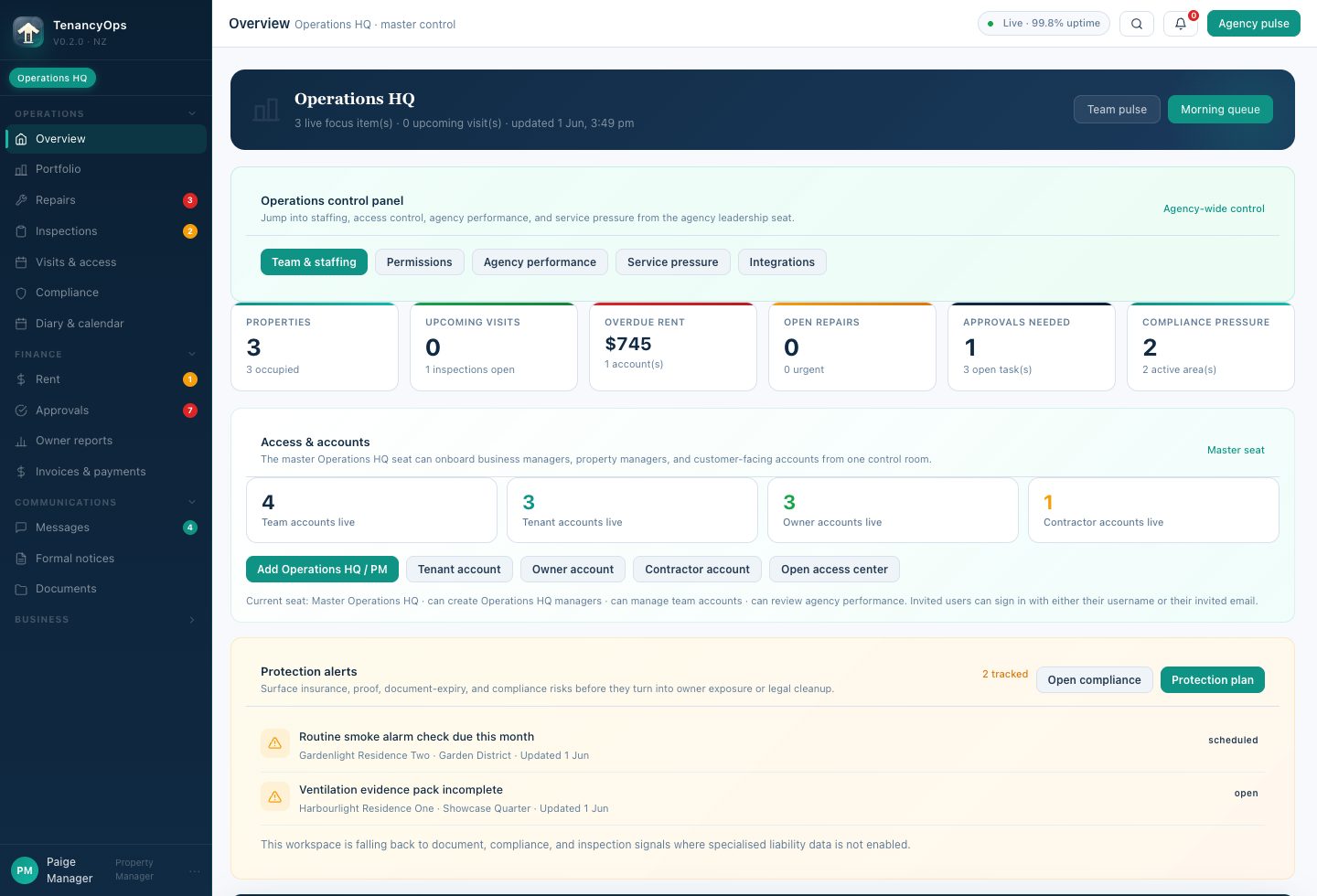
Screens show seeded demo data for marketing demos. Final client setup, permissions, migration scope, and assurance evidence are confirmed during onboarding or procurement.
The daily work, not just the dashboard.
Maintenance, approvals & proof
Log issues, triage risk, request owner approval, dispatch contractors, and track outcomes. The decision trail stays attached to the property file.
Geo-aware visits & routes
Plan inspection routes, create live bookings, send tenant notices, and record on-the-way updates without moving work into side texts.
Four role-shaped portals
PMs, tenants, owners, and contractors each get a clear view for requests, approvals, jobs, documents, and messages, never the whole workspace.
Rent statements & household bills
Tenants download their own rent statements for references and creditors, with power, internet, and water visible in one practical renter view.
Documents, photos & evidence
Leases, Healthy Homes evidence, inspection files, completion proof, statements, and exportable history, all on the operating record.
CRM, BDM & growth desk
Pipeline, retention, owner reporting, rent pressure, and hand-off discipline, so growth work stays connected to operations.
Student accommodation
Room records, resident communication, maintenance, inspections, move-ins, move-outs, conduct notes, documents, and payment visibility for student housing teams.
Commercial & sales desks
Leases, outgoings, listings, vendors, buyers, viewings, offers, deposits, conditions, and handovers on one property-centred record.
Global & multi-branch control
Ops HQ rolls branches, countries, risk, migration, and readiness into one leadership view. Scale and Enterprise add white-label rollout.
Role-based boundaries
Leaders, PMs, tenants, owners, and contractors each get their own workspace, permissions, and operating responsibilities. Access stays clean.
Transparent pricing. No hidden seat fees.
Platform fee plus managed doors, with accounting, payroll, and the email hub included in your plan, not sold back to you as add-ons.
Core
- PM workspace & connected portals
- Maintenance, approvals, communication & proof
- Compliance tracking & evidence exports
- CRM/BDM, advanced automation, white-label
Pro
- Everything in Core
- CRM pipeline, BDM desk, growth & retention
- Automation engine & deeper finance operations
- White-label branch kit & custom domain
Scale
- Everything in Pro
- Full white-label branch kit & custom domain
- Ops HQ, rollout desk & multi-branch controls
- Higher-touch migration & launch support
Enterprise
- Everything in Scale
- Procurement, assurance & migration planning
- Customer-specific operating pack
- External assurance pathway for public sector
Know your exact number before you talk to anyone.
Drag the slider or type your exact number, 60 doors or 16,000, the maths is the same.
- Accounting, payroll & email hub included in every plan
- No seat fees, your whole team is covered
- Billed monthly, scoped migration for larger portfolios
Add what you pay for other software today
Billed monthly as platform fee plus managed-door fee. Enterprise, iwi, franchise, social-housing, student accommodation, and government-adjacent rollouts are scoped separately.
Straight answers before the demo.
Is TenancyOps only for residential property managers?
No. The platform supports residential property management, commercial property, HousingOps, student accommodation, and real-estate sales. Teams that cross more than one area do not need separate systems for each part of the portfolio.
Do accounting and payroll really come included?
Yes. Business accounting and payroll are part of the platform, not paid add-ons. That includes invoicing, payables, reconciliation-ready records, owner statements, and staff payroll. Regulated client trust accounting is scoped carefully during onboarding so you know exactly where the boundary sits in your market.
How does the email hub work?
You connect your existing email accounts and work them inside TenancyOps, similar to adding an account to the Mail app on a phone. Property-related messages can be filed directly to the right record, so important correspondence stops living in personal inboxes.
Can it support student accommodation?
Yes. Student housing teams can manage room records, resident communication, maintenance, inspections, move-ins, move-outs, conduct notes, documents, payments, and evidence from one operating record.
Can it run outside Australia and New Zealand?
Yes. The core platform covers records, portals, workflows, evidence, CRM, and email across borders. Market-specific details such as payroll rules, tenancy compliance, and banking are configured during onboarding, with no guessing about what is ready in each country.
Does Pro include white-label?
No. Pro includes the commercial and operational toolkit, but white-label branch kit and custom domain start at Scale and continue into Enterprise.
Can iwi, councils, or social-housing providers use it?
Yes. That is what HousingOps is for. Larger regulated rollouts still go through customer-specific procurement, privacy, security, and operating sign-off, which we support.
Is the pricing final?
The public package pricing is Core NZ$99 plus NZ$1.35 per door, Pro NZ$199 plus NZ$1.40 per door, Scale NZ$699 plus NZ$1.50 per door, and Enterprise custom.
Can I see a demo before committing?
Yes. The best next step is a demo focused on your current workflow, portfolio size, pain points, and rollout fit.
Does TenancyOps replace legal advice?
No. TenancyOps organises operational evidence and workflow. It does not replace tenancy, legal, accounting, compliance, or procurement advice.
Show us the workflow you actually run.
No pressure. The first conversation is about portfolio size, current tools, operational friction, migration risk, and which plan is genuinely the right fit.